Survey Analytics 101: Turn AI Insights into Decisions
You just closed a product feedback survey. 2,147 responses sitting in your dashboard. Your VP wants insights by Friday. You open the spreadsheet and feel... nothing. Just rows. Where do you even start? This guide is for product teams, marketers and customer experience and support teams.
If that scenario sounds familiar, you are not alone. Most teams are surprisingly good at collecting survey data and shockingly bad at doing anything useful with it. The survey goes out, responses trickle in, someone exports a CSV, and then... it sits. Maybe someone pulls an average score for a slide deck. Maybe the open-ended responses never get read at all.
The gap between collecting feedback and making decisions from feedback is where most survey programs die. This guide closes that gap.
You are going to learn a 5-step framework for turning raw survey data into decisions that actually move revenue, retention, and product quality. Each step is a mini-workshop you can apply to whatever data you have sitting in front of you right now.
Step 1: Stop looking at averages
Here is your first instinct when you open survey results: look at the average score. "Our product satisfaction is 3.8 out of 5. Not bad!"
Stop. That number is lying to you.
Averages flatten the story. A 3.8 could mean everyone feels lukewarm. Or it could mean half your users love you and half want to leave. These are radically different situations requiring radically different responses.
Here is a real example. You survey 200 users on satisfaction with your new dashboard feature:
Rating Distribution for "Dashboard Satisfaction"

1 star  ||||||||||||||||||||           (40 users - 20%)
2 stars |||||||                        (14 users -  7%)
3 stars ||||||                         (12 users -  6%)
4 stars ||||||||                       (16 users -  8%)
5 stars ||||||||||||||||||||||||||||||  (118 users - 59%)

Average: 3.8 / 5
That 3.8 hides a bimodal distribution. You have a polarized user base. The 59% who love it are probably your power users. The 20% who hate it might be new users struggling with the learning curve. If you report "3.8, we're doing fine," you miss the 40 people actively considering alternatives.
Try this right now: Take your most recent survey results. Instead of looking at the mean, look at the distribution. Plot the response counts for each rating level. If you see two peaks instead of one bell curve, you have a segmentation problem, not a satisfaction problem.
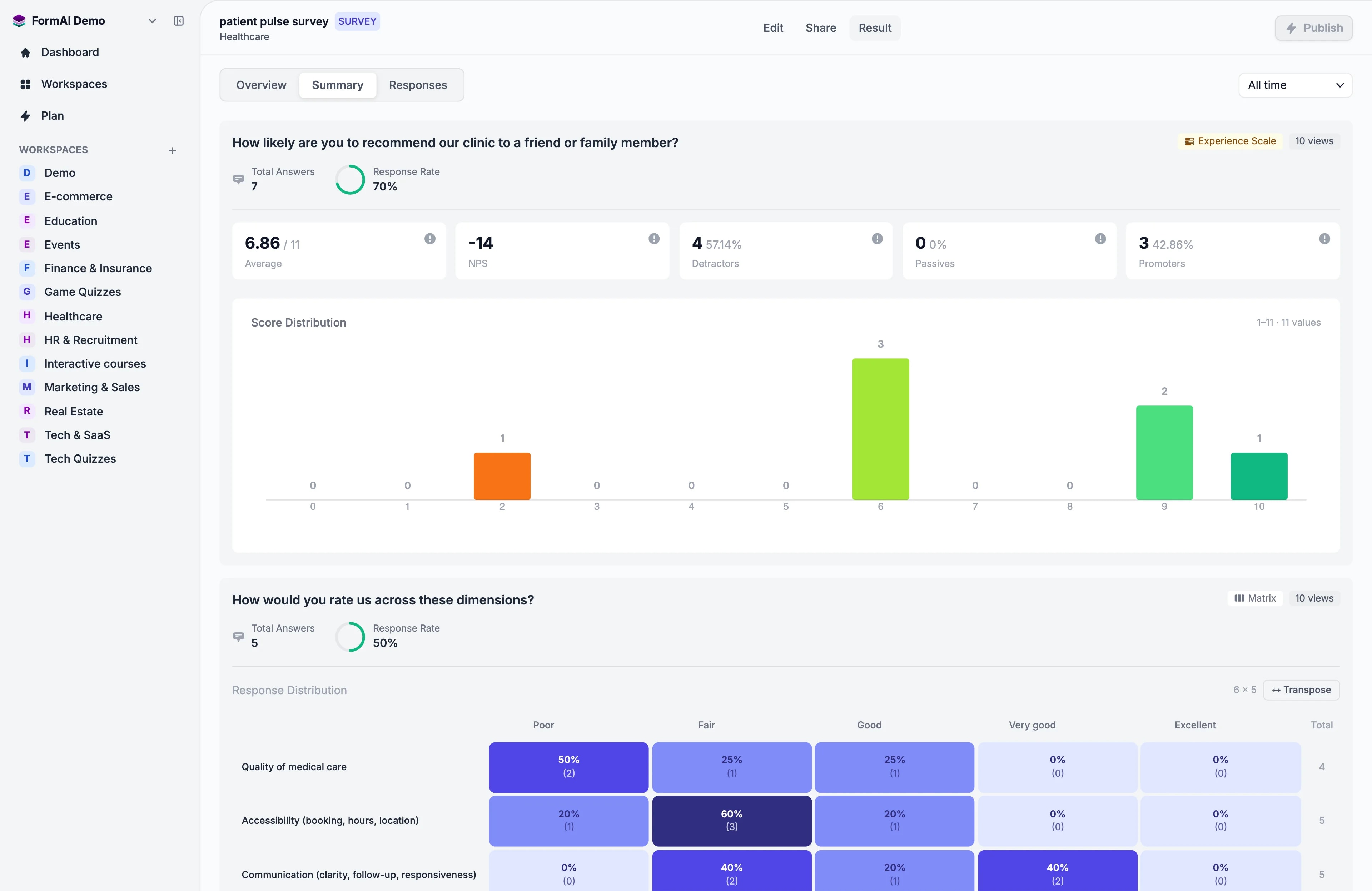
Distribution visualizations alongside every rating question are available now in FormAI's analytics dashboards. The goal is for you to see the histogram before you ever see the average, so you cannot accidentally ignore a bimodal pattern.
The rule: Never report an average without its distribution. If someone on your team presents a mean score without showing the shape of the data, send them this article.
Step 2: Let AI read the open-ended responses
You have 2,147 responses. Maybe 800 of them include open-text answers. Nobody on your team is going to read 800 free-text responses. And if they try, they will unconsciously overweight the first 30 and the last 10, ignoring everything in between.
This is where AI-powered sentiment analysis and theme clustering change the game.
Here is what the process looks like. Take these 5 raw responses from a customer satisfaction survey about your checkout flow:
Before: Raw Responses
| # | Response |
|---|---|
| 1 | "Checkout was fine but I couldn't figure out how to apply my discount code. Gave up and paid full price." |
| 2 | "Love the one-click purchase option. So much faster than before. Great improvement!" |
| 3 | "Where do I enter a promo code?? I spent 5 minutes looking. Ended up googling it." |
| 4 | "Smooth experience overall. The Apple Pay integration is a nice touch." |
| 5 | "Discount field is buried. Almost abandoned my cart because I thought you didn't accept coupons anymore." |
Now watch what happens when AI clusters these by theme and assigns sentiment:
After: AI-Analyzed Themes
| Theme | Responses | Sentiment | Key Insight |
|---|---|---|---|
| Discount/promo code UX | #1, #3, #5 | Negative (avg -0.7) | Users cannot find the coupon field. 3 of 5 responses mention this. Revenue risk from cart abandonment. |
| Checkout speed and payment options | #2, #4 | Positive (avg +0.9) | One-click purchase and Apple Pay are delighting users. This is a competitive advantage. |
In 5 seconds, you went from "I have 5 responses" to "I have two clear themes, one of which is costing us money." Now scale that to 800 responses and you see why this matters.
Try this: Pick 20 open-ended responses from your last survey. Read them and manually group them into themes. Time yourself. Now imagine doing that for 2,000 responses. That is the problem AI solves, and it does it in seconds, not days.
Real-time response dashboards and word clouds are available now, but theme clustering and sentiment analysis on every open-text response as it arrives are on FormAI's analytics roadmap (coming soon). The goal is a live, updating view of what your respondents are talking about and how they feel about it, without exporting a single CSV.
Step 3: Segment before you summarize
Here is a mistake that costs teams months of misguided effort: they look at the aggregate and assume everyone feels the same way.
They do not.
The same survey will tell completely different stories depending on who you ask. Your job is to split the data by meaningful segments before you draw conclusions.
Consider this example. You run an employee engagement survey across your company. The overall engagement score is a healthy 7.2 out of 10. Leadership is satisfied. But look at what happens when you segment:
| Segment | Engagement Score | Top Concern | Likely Action |
|---|---|---|---|
| Engineering (n=120) | 8.1 | "Want more conference budget" | Low priority, nice-to-have |
| Sales (n=85) | 7.8 | "CRM is slow" | IT ticket, quick fix |
| Customer Support (n=95) | 4.9 | "Burnout, understaffed, no career path" | Urgent. Retention risk. |
| Marketing (n=60) | 7.6 | "Cross-team visibility" | Process improvement |
That 7.2 average was hiding a crisis in Customer Support. A 4.9 engagement score means you are about to lose people. If you only looked at the aggregate, you would have missed it entirely until the resignation letters started arriving.
Try this: Take your last survey results and split them by your two most obvious segments (department, customer tier, whatever makes sense). Compare the scores side by side. If any segment is more than 1.5 points away from the average on a 10-point scale, you have found something worth investigating.
Defining segments during survey creation and filtering, comparing, and drilling into any segment in an analytics dashboard is available now. Automatic cross-segment comparison of segments you define is on FormAI's roadmap (coming soon). The goal: filter, compare, and drill into any segment without touching a spreadsheet.
Step 4: Track trajectories, not snapshots
A single survey is a photograph. Useful, but static. You cannot tell if things are getting better or worse from a single data point.
You need a movie. That means running comparable surveys over time and tracking how sentiment shifts.
Here is a simple example. You run a quarterly NPS survey for your SaaS product:
| Quarter | NPS Score | Promoters | Detractors | What Happened |
|---|---|---|---|---|
| Q3 2025 | +32 | 48% | 16% | Baseline measurement |
| Q4 2025 | +18 | 40% | 22% | New pricing tier launched |
| Q1 2026 | +41 | 52% | 11% | Pricing adjusted + onboarding revamp |
The pricing change in Q4 2025 caused a measurable sentiment drop. Your team adjusted the pricing and revamped onboarding. By Q1 2026, NPS rebounded beyond the original baseline. That is the power of trajectory tracking: you can measure the impact of your decisions, not just the current state.
Try this: If you have run the same survey more than once, pull the key metrics side by side. Plot them on a timeline. Look for inflection points and match them to business events (product launches, pricing changes, support process updates). You will start to see cause and effect.
Trend tracking when you reuse or duplicate a survey is available now: a dashboard that overlays results from multiple waves with period-over-period trend and time series. Highlighting statistically significant changes and flagging inflection points is on FormAI's roadmap (coming soon).
Step 5: Build the insight-to-action-to-impact loop
This is where most analytics programs fail. You have the insight. You know what the data says. But the insight never becomes a decision, the decision never becomes an action, and the action never gets measured.
You need a structured loop. Here is the template:
Insight (what the data tells you) -> Hypothesis (what you think it means) -> Action (what you will do) -> Metric (how you will measure success) -> Timeline (when you will check)
Here are three filled-in examples from real scenarios:
Example 1: Product Feedback
| Element | Detail |
|---|---|
| Insight | 34% of open-text responses mention "slow load times" on the reporting dashboard |
| Hypothesis | Performance issues are driving down satisfaction and may increase churn among data-heavy users |
| Action | Engineering sprint to optimize report query performance; target 50% load time reduction |
| Metric | Dashboard satisfaction score in next survey + page load time analytics |
| Timeline | Ship fix in 4 weeks, re-survey in 8 weeks |
Example 2: Employee Engagement
| Element | Detail |
|---|---|
| Insight | Customer Support team engagement dropped from 6.8 to 4.9 in one quarter |
| Hypothesis | Understaffing and lack of career development are driving burnout |
| Action | Hire 3 additional support reps; launch a career progression framework for the support team |
| Metric | Next quarter engagement score + voluntary attrition rate |
| Timeline | Hiring complete in 6 weeks, re-survey in 12 weeks |
Example 3: Customer Experience
| Element | Detail |
|---|---|
| Insight | NPS dropped 14 points after the pricing tier change; detractors cite "value for money" |
| Hypothesis | Mid-tier customers feel they lost features without a proportional price reduction |
| Action | Introduce a transitional plan for existing mid-tier customers; grandfather current features for 6 months |
| Metric | NPS recovery in next quarterly survey + mid-tier churn rate |
| Timeline | Announce within 2 weeks, measure NPS at next quarterly survey |
The loop only works if you actually close it. That means re-surveying after you take action and comparing the before and after. If the metric improved, your hypothesis was right. If it did not, you learned something equally valuable.
Try this: Take your single most important survey finding from this quarter. Fill in the five-part template above. If you cannot fill in every field, the insight is not actionable yet and needs more investigation.
The 5 metrics that actually predict business outcomes
Not all survey metrics are created equal. Here are five that, as of 2026, are commonly used to track revenue, retention, and growth signals:
1. Net Promoter Score (NPS): The classic "would you recommend us?" metric. Useful not for the absolute number, but for the trend over time and the gap between promoters and detractors. Track it quarterly.
2. Customer Effort Score (CES): "How easy was it to accomplish your goal?" Often cited as one of the strongest signals of customer loyalty. High effort tends to correlate with churn risk. Use it after key interactions: support tickets, onboarding, purchases.
3. Response Rate as a Proxy Metric: Your survey response rates tell you something about engagement even before you read a single answer. Declining response rates signal disengagement, survey fatigue, or a deteriorating relationship. If fewer people bother to respond each quarter, that itself is a finding.
4. Sentiment Trajectory: "Which direction is sentiment moving, and how fast?" A product with a -0.2 sentiment that is improving by 0.1 per quarter is in a fundamentally different position than one at +0.3 that is declining by 0.15 per quarter.
5. Open-Text Theme Velocity: How quickly is a new theme growing in your open-ended responses? If "pricing concerns" went from 4% of responses to 18% in two survey waves, that theme has high velocity and deserves immediate attention, even if overall sentiment is still positive.
Tracking all five of these metrics in an analytics dashboard is available now; automated alerts when any metric crosses a threshold or changes trajectory significantly are on FormAI's roadmap (coming soon).
Common mistakes teams make with survey analytics
Avoid these pitfalls. Every one of them leads to bad decisions:
Cherry-picking responses to support a narrative. You already believe the new feature is great, so you pull 5 glowing quotes for the slide deck and ignore the 30 complaints. This is the most common and most dangerous analytics mistake. Let the data lead; do not go looking for confirmation.
Ignoring open-text responses entirely. Rating scales tell you what. Open-text tells you why. If you are only looking at numbers, you are missing the most valuable part of your data. AI makes it possible to analyze every single open-text response, so there is no excuse to skip them.
Reporting without recommendations. A dashboard that says "NPS is 32" without saying "here is what we should do about it" is a wall decoration, not an analytics tool. Every insight you present should come with a recommended next step.
Surveying too infrequently. Annual surveys are autopsies. By the time you get the results, the patient is already gone. Quarterly is the minimum cadence for relationship metrics. Transactional surveys (post-support, post-purchase) should happen after every interaction.
Treating all feedback equally. A response from a $200K enterprise customer and a response from a free trial user who signed up yesterday carry different weight. Segment and weight accordingly, especially when making resource allocation decisions.
Bringing it all together
Here is the framework in one glance:
- Stop looking at averages: distributions reveal the real story
- Let AI read the open-ended responses: theme clustering and sentiment analysis at scale
- Segment before you summarize: the aggregate always lies
- Track trajectories, not snapshots: measure the impact of your decisions over time
- Build the Insight-to-Action-to-Impact loop: close the gap between knowing and doing
The May 4, 2026 FormAI public beta ships AI form generation, AI question refinement (bias/tone), surveys, quizzes, and live sessions. Real-time analytics and AI report generation (distributions, cross-segment comparison, and trend tracking across survey waves) are available now in the beta. Theme clustering and sentiment analysis of open-text responses are on the post-beta roadmap. The goal is for your job to shift from "analyzing data" to "making decisions."
For more on collecting better data in the first place, read our guides on product feedback collection, AI data collection trends shaping this year, strategies for improving survey response rates, and how synthetic respondents can help you pretest before you launch.
The survey is not the product. The decision is.
Here is the uncomfortable truth: nobody cares about your survey. Not your VP, not your customers, not the board. They care about decisions. They care about what changes.
A perfectly designed customer satisfaction survey with a 90% response rate and beautiful visualizations is worth exactly nothing if it does not change a single decision your team makes.
The survey is the tool. Analytics is the process. The decision is the product.
Start treating your survey analytics as a decision-making engine, and you will never look at a spreadsheet full of rows and feel nothing again.
Start turning survey data into decisions with FormAI
or explore how to
build customer satisfaction surveys people actually complete
.